

Best Text-to-Speech Apps: Methods, Data and Trade-Offs
A transparent TTS app comparison using dated product data, official sources, disclosed first-party limits, screenshots and a test you can repeat on your own document.
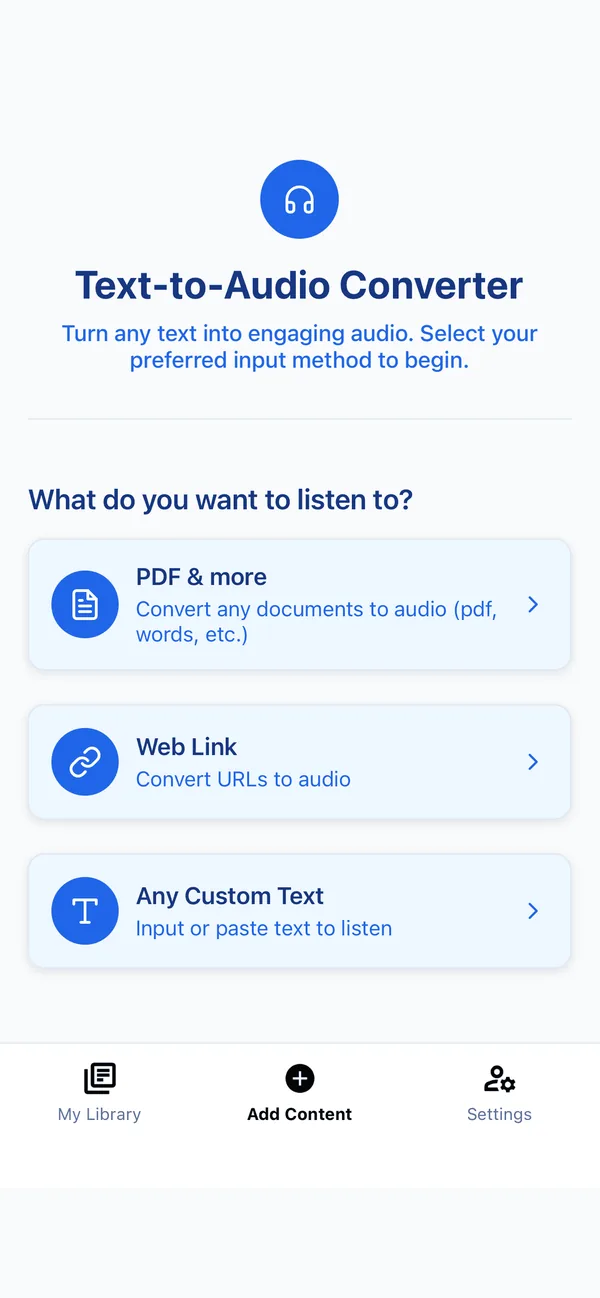
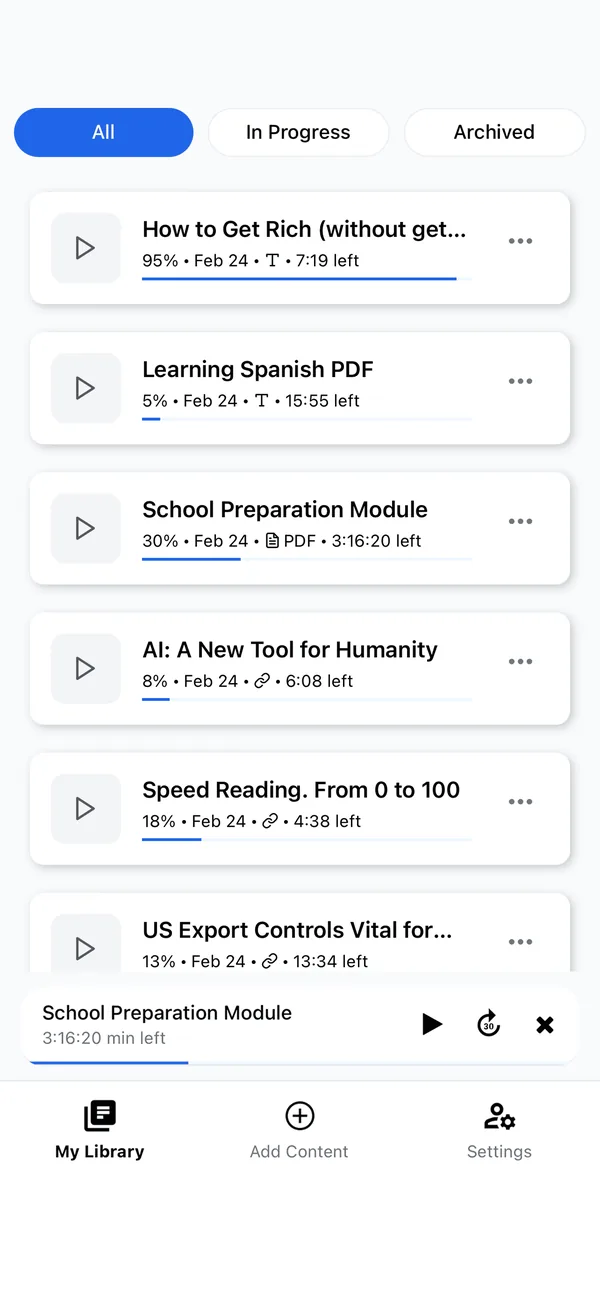
Listen to the test samples
Use headphones and keep the volume constant if you compare samples.
Key takeaways
- There is no single best text-to-speech app — the right one depends on your budget, devices, and whether you read documents, articles, or academic papers.
- Voice quality has converged: most top apps now use natural neural voices, so price, free limits, and how easily you can add content matter more than the voices alone.
- Published feature counts and prices change frequently; this guide records the source and verification date instead of presenting them as permanent facts.
- Frateca is our product, so its hands-on results are first-party evidence. Competitor entries are a dated official-source audit, not disguised independent testing.
“What’s the best text-to-speech app?” is almost the wrong question, because it has several right answers depending on who’s asking. Voice generation has improved, but quality still varies by voice, language, punctuation, text and speed. The practical differences—formats, navigation, platform coverage, privacy, current limits and total price—often decide whether an app fits a real workflow.
We build Frateca, so this cannot be an independent review. This comparison combines a hands-on first-party test of Frateca with a dated audit of competitors’ official product and support pages. We did not buy every competitor’s current paid tier, and we will not describe desk research as hands-on testing. The method, sources, screenshot and reusable audio sample are published above so you can judge the limits.
The quick comparison
| App | Product emphasis | Pricing status on July 17, 2026 | Platforms claimed by vendor |
|---|---|---|---|
| Frateca | Cross-platform document and article listening | $0 daily plan; site lists $8.99/month or $47/year | iOS, Android, Web |
| Speechify | Broad reading ecosystem and speed controls | Verify live price and renewal terms | iOS, Android, Web, browser extension |
| ElevenReader | Expressive voices, imports and an audiobook catalog | Import reader and separate catalog/Ultra offers; verify in app | iOS, Android, Web |
| NaturalReader | Document reading, OCR and web tools | Multiple personal tiers; verify live plan | iOS, Android, Web, browser extension |
| Voice Dream Reader | Deep reading controls and accessibility | App/subscription history varies by user; verify in app | iOS, Mac |
| Listening.com | Academic paper workflow | Subscription; verify live offer | iOS, Android, Web |
| Edge Read Aloud | Browser pages and PDFs | Included with Edge | Desktop browser |
| Apple Spoken Content | System-level speech | Included with Apple OS | Apple devices |
| Android accessibility tools | System-level spoken feedback | Included with Android | Android |
The table deliberately avoids copying volatile competitor prices from old reviews. Follow the disclosed sources, check the final checkout screen in your region, and record renewal price and usage limits before subscribing.
1. Frateca — best all-round value
We’ll be upfront: this is our app, so weigh the rest of the list accordingly. But the reason Frateca exists is the gap we kept seeing: the good apps were expensive, and the cheap ones sounded robotic. Frateca turns PDFs, ePub books, Word docs, web articles, research papers, newsletters and pasted text into natural audio, and it scans physical book pages with your camera using OCR. It runs on iOS, Android and the web, and syncs your library across all three.
The site advertises a daily free plan with no credit card and listed Premium at $8.99/month or $47/year on the test date. There is also a share workflow: from a supported mobile app, send an article or file to Frateca and it lands in the library. If you want the short version, see how to listen to PDFs and how to listen to a web article.
Best for: anyone who wants natural audio across all their devices without paying a premium price. Trade-off: it focuses on listening to content, not voice-over production or voice cloning.
2. Speechify — broad ecosystem and speed controls
Speechify markets a broad reading ecosystem across mobile, web and browser tools, with adjustable playback speed and premium voices. That breadth can matter if your content already moves across several surfaces.
Its price, trial terms, renewal amount, voice access and usage limits are volatile and can differ by region. Check the official pricing page and final checkout screen, then compare the same document on the free/trial experience. Our Speechify alternatives and dated, source-backed Frateca vs Speechify comparison show the trade-offs in more detail.
Consider it if: platform breadth and fast playback controls matter more than minimizing cost. Verify: the current renewal price and exactly which voices and minutes/words the selected tier includes.
3. ElevenReader — expressive speech and a growing book catalog
ElevenLabs says ElevenReader converts articles, ePubs, PDFs and other text to speech in 32 languages. In May 2026 it also announced a catalog of more than 200,000 premium audiobooks and ebooks, separating imported-document reading from a growing commercial book service.
That makes it important to identify what you are pricing: importing your own text, buying a title, or subscribing to the premium catalog. The May 2026 launch listed Ultra at $11/month with 20 hours of premium-title access, but offers can change. Verify the in-app terms and test your own import rather than judging only a catalog sample. See ElevenReader alternatives for a narrower dated comparison.
Consider it if: expressive voices and a combined import-plus-book-catalog experience appeal to you. Verify: which features belong to imports versus purchased or subscription titles.
4. NaturalReader — the document specialist
NaturalReader focuses on document handling, OCR, personal apps and browser-based reading. Its official site separates personal and commercial products, and current offers may be shown inside the web app; that is why copying one price or allowance into a timeless table is risky. Check that the selected plan covers personal rather than commercial use and supports the formats and voices you need.
It is a candidate for a document-centric workflow, particularly if OCR and desktop/browser use matter. See NaturalReader alternatives for a narrower dated audit, then verify it against the live plan.
Consider it if: document formats and OCR are the priority. Verify: personal-use licensing, the exact voice tier, and current conversion limits.
5. Voice Dream Reader — the accessibility power tool
Voice Dream Reader is a long-time favourite in the accessibility community for a reason: auto-highlighting, deep customization, annotation, and navigation for complex documents are best-in-class. If you read along while you listen (bimodal reading) and you annotate heavily, nothing matches its control.
It is Apple-first (iOS and Mac). Voice Dream’s own 2024 pricing update documents a proposed subscription change and a partial reversal for existing purchasers, so a single universal price would be misleading. New and existing users should verify the current in-app offer. We cover substitutes in Voice Dream Reader alternatives.
Consider it if: you use Apple devices and need deep highlighting, navigation, pronunciation and offline controls. Verify: current new-user pricing and whether a required voice is included or purchased separately.
6. Listening.com — built for academic papers
If you live in research papers, Listening.com is purpose-built for you. It understands paper structure (abstract, sections, findings), skips citations and watermarks, lets you bookmark sentences, and renders journal PDFs cleanly so you don’t hear “doi.org/…” after every page. For a literature review, that focus is a real advantage.
It’s narrower than the all-rounders and priced as a subscription with a short trial. If your reading is mostly papers, it’s worth a look; if it’s a mix of papers, books and articles, a generalist like Frateca covers papers too. See how to listen to research papers.
Best for: academics and researchers drowning in PDFs. Trade-off: specialised; less suited to general reading.
7–9. The free built-in options
Don’t overlook what you already own:
- Microsoft Edge “Read Aloud” reads any web page or PDF opened in Edge, free, with surprisingly decent neural voices. Great for desktop reading.
- Apple “Speak Screen” (Settings → Accessibility → Spoken Content) reads whatever’s on your iPhone screen with a two-finger swipe down. Functional, free, a little clunky.
- Android “Select to Speak” / Google TalkBack does the equivalent on Android.
These are excellent zero-cost fallbacks. Their limits are voice quality (more robotic), the fact they read the screen rather than ingesting a document, and clumsy handling of long files. We compare them properly in the best free text-to-speech apps.
How to choose in 30 seconds
- You want the best value and you use more than one device → Frateca.
- You want maximum speed and don’t mind the price → Speechify.
- Voice quality is everything, especially for novels → ElevenReader.
- You mostly read documents at a desk → NaturalReader.
- You annotate heavily on an iPhone or Mac → Voice Dream Reader.
- You live in academic papers → Listening.com.
- You want to spend nothing today → your browser’s or phone’s built-in reader.
Test them yourself in 10 minutes
Reviews only get you so far, because the right app depends on your ears and your reading, not someone else’s. A quick hands-on test beats any chart:
- Pick one real document you actually need to get through — a PDF, a long article, a chapter.
- Run it through two free tiers on the same passage, say Frateca and one other.
- Listen to a full page in each, not a demo line, ideally something with a long, comma-heavy sentence.
- Notice which voice you stop noticing. The one that fades into the background is the one you’ll actually keep.
Ten minutes spent this way tells you more than an afternoon of reviews.
So which one should you actually install?
Pick the app that fits how you read, not the one with the loudest marketing. Voice quality matters, but so do document structure, navigation, privacy, accessibility, price and the friction of adding material. Run the same passage and file through two candidates, record the date and plan, and choose from your results—not this publisher’s commercial interest.
Honestly, the fastest way to settle this is to stop reading comparison tables and listen to one. Paste your own text into the live demo, pick a voice, and hear it in your browser. If it sounds right, start free on something you’ve actually been meaning to get to.
Stop reading. Start listening.
Frateca turns PDFs, articles, textbooks and web pages into natural audio you can play anywhere — on your commute, at the gym, or while you cook. Free plan included, no card required.
Try Frateca free →iOS · Android · Web · Free plan, no credit card required