



Reads everything you throw at it
Type anything, hear it instantly
This is the real Frateca voice engine. Paste up to 3,000 characters, pick a voice, and listen — no sign-up needed.
You've used your free previews
Create a free account to keep listening: turn PDFs, ebooks and articles into natural audio with a daily free allowance, synced across your phone and the web. No credit card needed.
Free demo · up to 3,000 characters per clip · The app reads whole PDFs, books and articles →
Reading time is scarce.
Listening time is everywhere.
Let Frateca read to you with a natural AI voice during your commute, workouts, and chores.
minutes of audio generated in the Frateca app
natural AI voices across 8 languages
daily active listeners from across the globe
There's a Frateca for every reader
However you read today, listening slots into the gaps in your day.
Students
Turn textbooks, papers, and lecture notes into audio you can revise on the bus.
I use this app to listen to lecture readings and it’s a lifesaver. The voices are really natural which makes it really easy to listen to. pin<33 · App StoreLearn more
Busy professionals
Clear your reading backlog — reports, long articles, newsletters — while you commute or work out.
Frateca has helped me to cut down time especially when driving/traveling. Instead of reading I can listen to my documents on my way. Teesa1977 · App StoreLearn more
Rest your eyes
Screen-free reading for low vision, dyslexia, or plain fatigue — tune the voice and speed to suit you.
I am someone who benefits from reading while also hearing the text read aloud, it helps me to better engage with the article or book. Cheyenne:) · App StoreLearn more
Multitaskers
Listen while you cook, walk, train, or commute — turn dead time into reading time.
I love that I can listen to my book in the background! It helps me when I have a lot of things to do in my day. Anony99007 · App StoreLearn more
From page to play in three steps
Add something to read, pick a voice, and keep listening wherever you go. Free to start.
Add anything you want to hear
Paste text, drop in a PDF or web link — or scan book pages with your camera.
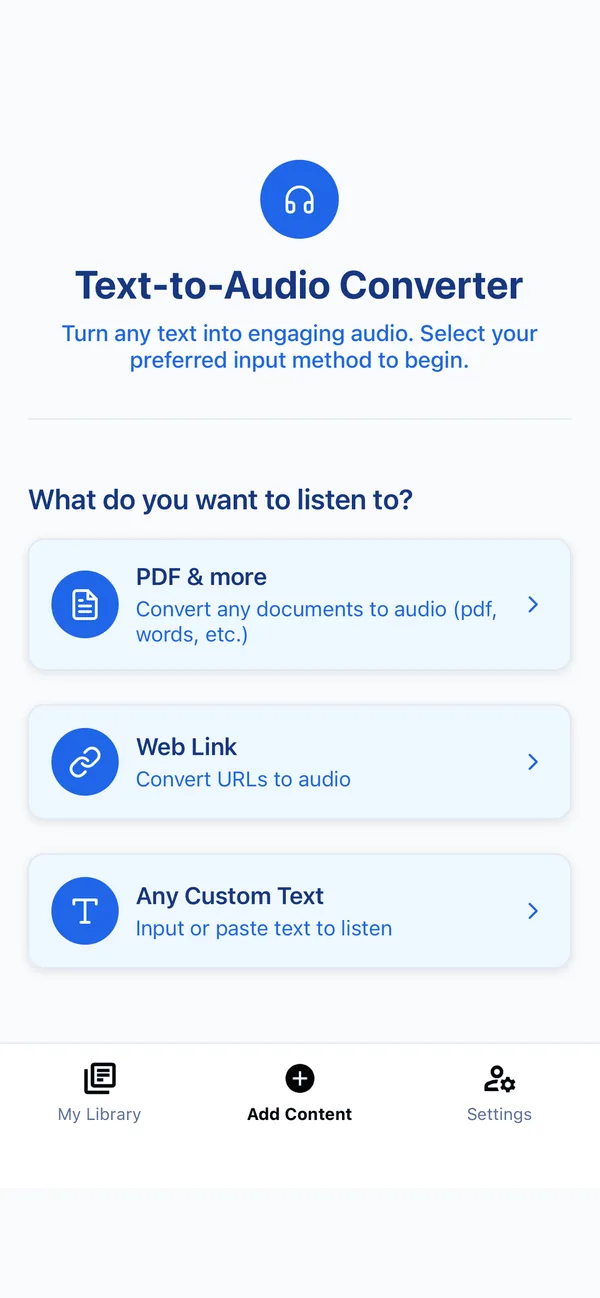

Frateca turns it into natural audio
Choose from natural AI voices in 8 languages. Short texts are ready in seconds, long documents in a few minutes.
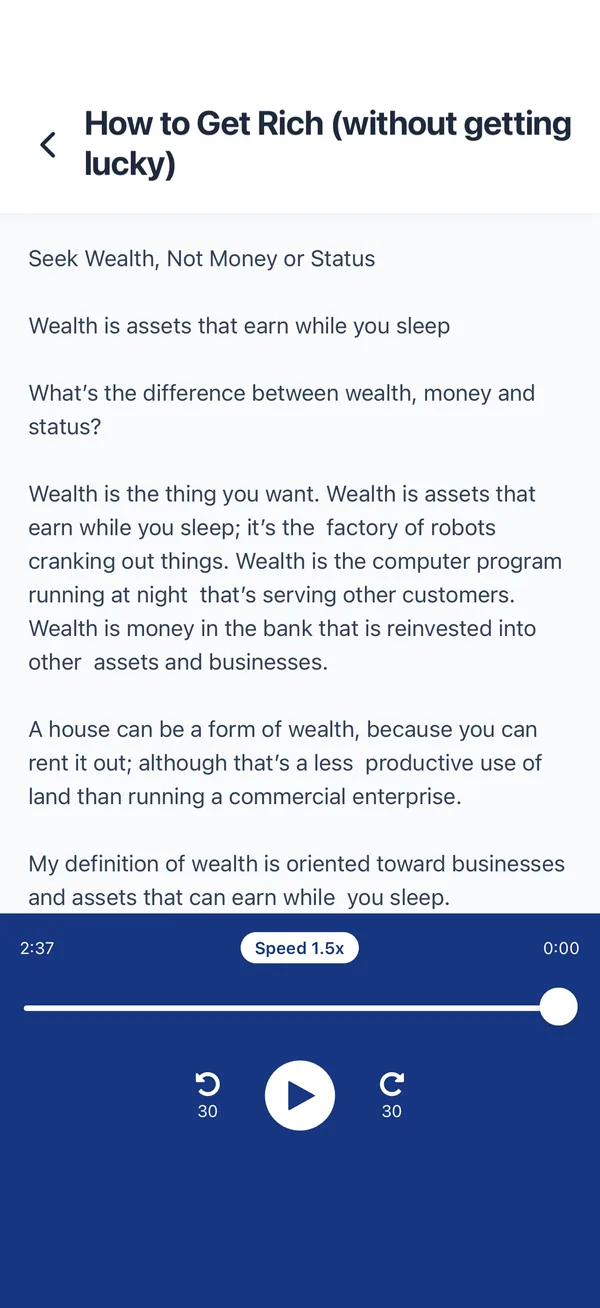
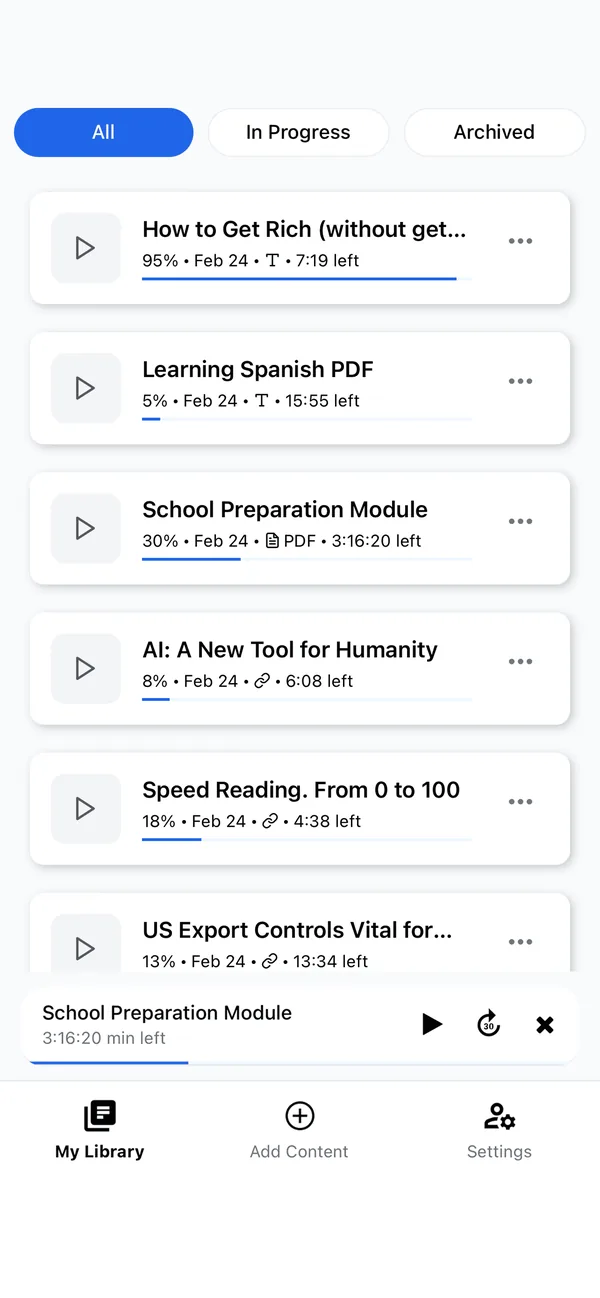
Listen anywhere, even offline
Your library plays in the background — on commutes, workouts, and chores.

Reading in Chrome?
Listen right on the page.
Select any text, right-click and choose “Listen to selected text”. Frateca starts reading in a natural voice within seconds and highlights each word on the page as it goes. Want the whole article? Save the full page to your library and finish it on your phone.
- Word-by-word highlighting Follow along on the original page. Click any word to jump there.
- Save full pages One right-click turns a whole article into audio in your library.
- Your speed, your voice Natural voices in 5 languages, from 0.75× up to 3.5×.
- One library everywhere Pick up where you stopped on the web, iPhone or Android.
Free to install · Windows, Mac, Linux & Chromebook
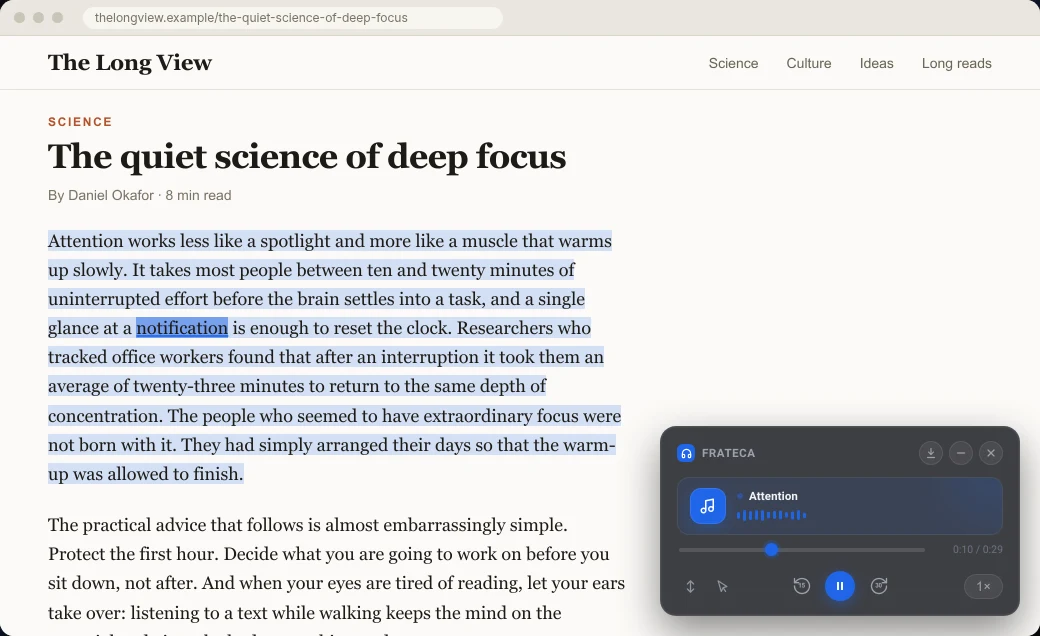
 Listen to selected text
Start free. Upgrade when you're hooked.
Transparent pricing, no surprises. Every plan works on iOS, Android, the web and Chrome.
Free forever
Basic access with essential features.
Start freeNo credit card required
- 20 minutes of audio every day
- Natural-sounding AI voices
- PDFs, web links, and pasted text
- Available for iOS, Android, web & Chrome
- Organize your content library (Premium only)
- Priority customer support (Premium only)
or $47/year — save 56%
Unlimited listening for serious learners.
Go PremiumCancel anytime · iOS, Android, web & Chrome
- Unlimited listening
- Enhanced, more natural-sounding voices
- Organize your content library
- Access to all premium features
- Priority customer support
- Available for iOS, Android, web & Chrome
Loved by listeners everywhere
Real App Store reviews from Frateca listeners, quoted word for word.
 App Store review
I read a lot, and I listen to a lot of audiobooks. This app is so handy because you can import whatever file you need and have your own personal audiobook to listen to. The app is easy to use, very smooth and very intuitive. Love it!
App Store review I use this app to listen to lecture readings and it’s a lifesaver. The voices are really natural which makes it really easy to listen to… I’ve been using a lot of various Text to Speech apps but I found this one the most intuitive. Can’t recommend it enough :)
App Store review I’ve tried most of these types of apps and this one is the best. It’s great at reading technical docs. The voice is smooth, even at high rates, and the pronunciation is extremely good. Sounds like a person reading.
App Store review Out of so many of these text to speech apps (which are heavily priced) this one has been my favorite, many options for types of voices, is affordable and worth using in the long run.
App Store review This app has saved me! Frateca has helped me to cut down time especially when driving/traveling. Instead of reading I can listen to my documents on my way. It’s a great app and I’m excited about the update!
App Store review I am someone who benefits from reading while also hearing the text read aloud, it helps me to better engage with the article or book. I am a teacher of students with a variety of barriers to learning and I have found that this type of app is helpful for students to access the same content as their peers.
App Store review I’ve been using Frateca for about a week and really enjoy it. The free 20 minutes certainly goes fast and I definitely enjoyed the free trial! I have had a couple of technical issues but emailed support and they were resolved almost immediately! Definitely recommend.
App Store review Better than speechify. Cheaper too.
Questions, answered
Frateca is a text-to-speech app that reads your own reading material aloud in natural AI voices. It turns PDFs, ePub ebooks, Word documents, web articles, pasted text and photos of printed pages into audio. Frateca runs on iPhone, iPad, Android, the web and Chrome, and keeps one library in sync across all of them.
Yes. Frateca has a free plan with a daily listening allowance that resets every day, natural AI voices and no ads, and it needs no credit card. Frateca Premium is a monthly or yearly subscription that adds unlimited listening and enhanced voices. Both plans and their current prices are listed in the Pricing section of this page.
Frateca has an iOS app for iPhone and iPad, an Android app on Google Play, a web app at app.frateca.com and a Chrome extension for Windows, Mac, Linux and Chromebook. One account and one subscription cover all four, and your library syncs between them.
Frateca reads PDFs, ePub ebooks, Word documents, web pages from a link and pasted text. Scanned PDFs and photos of printed pages are converted with OCR (optical character recognition) before Frateca reads them aloud. On a phone you can also send an article, an email or a file from another app by tapping Share and choosing Frateca.
Yes. Open the Frateca app on your phone and photograph the pages with the camera. Frateca uses OCR to extract the text and reads it aloud. Clear, well-lit photos of plain text pages give the best results.
Frateca has 23 natural AI voices across 8 languages: English (US and UK accents), Spanish, French, Italian, Portuguese, Hindi, Japanese and Mandarin Chinese. The Chrome extension offers five of them: English, Spanish, French, Italian and Portuguese. You can hear the voices in the live demo on this page, and the app interface is available in more than 30 languages.
Yes. You can pick a different Frateca voice at any time, and Premium adds enhanced, more natural-sounding voices. Playback speed is adjustable up to 3.5×, so you can slow down for difficult material or speed up for review.
Yes. Add “Frateca — Free Text to Speech Reader” from the Chrome Web Store, select text on any web page, right-click and choose “Listen to selected text”, or save the whole page to your library. Frateca reads it aloud with word-by-word highlighting, and everything you save also appears in the web app and the iOS and Android apps.
Yes, for anything already in your library. Audio that Frateca has generated plays offline in the iPhone and Android apps, in the background and with the screen locked. Creating audio from a new document needs an internet connection, because the voices are generated on Frateca’s servers.
Frateca focuses on one job: listening to your own documents, articles and web pages at a low price, with the same library on your phone, the web and Chrome. Speechify offers more voices, desktop apps and extra AI features at a higher price. Dated comparisons with Speechify, NaturalReader, ElevenReader and other readers, each with official sources, are at frateca.com/compare.
Frateca is made by Novikov Studio LLC, the publisher of the Frateca app on the App Store and of the Frateca extension on the Chrome Web Store. Text and files you add are sent to Frateca’s servers over an encrypted connection to create the audio, and they stay in your library until you delete the item or your account. Frateca does not sell your personal information and never sends the content you convert to advertising platforms. The privacy policy has the details.
Press play on your reading list
Start in under a minute — free plan included.
No credit card required · Cancel anytime