Clear your reading backlog on the move
Frateca turns reports, long reads, newsletters and PDFs into natural audio — so you can get through them on your commute, at the gym, or between meetings.
Free plan included · iOS, Android & web · No credit card required
Hear a briefing-style passage
The article excerpt is preloaded. Test the voice now or replace it with up to 3,000 characters from your own reading backlog.
You've used your free previews
Create a free account to keep listening — turn entire PDFs, ebooks and articles into natural audio, unlimited, and synced across your phone and the web. No credit card needed.
Free demo · up to 3,000 characters per clip · The app reads whole PDFs, books and articles →
Share the long read, queue it, then leave the screen behind
Frateca accepts supported files, links and pasted text. The genuine library interface keeps that reading together so a report started at a desk can continue during a commute.
✓ Genuine Frateca product interfaceBefore · saved for later
After · genuine Frateca library
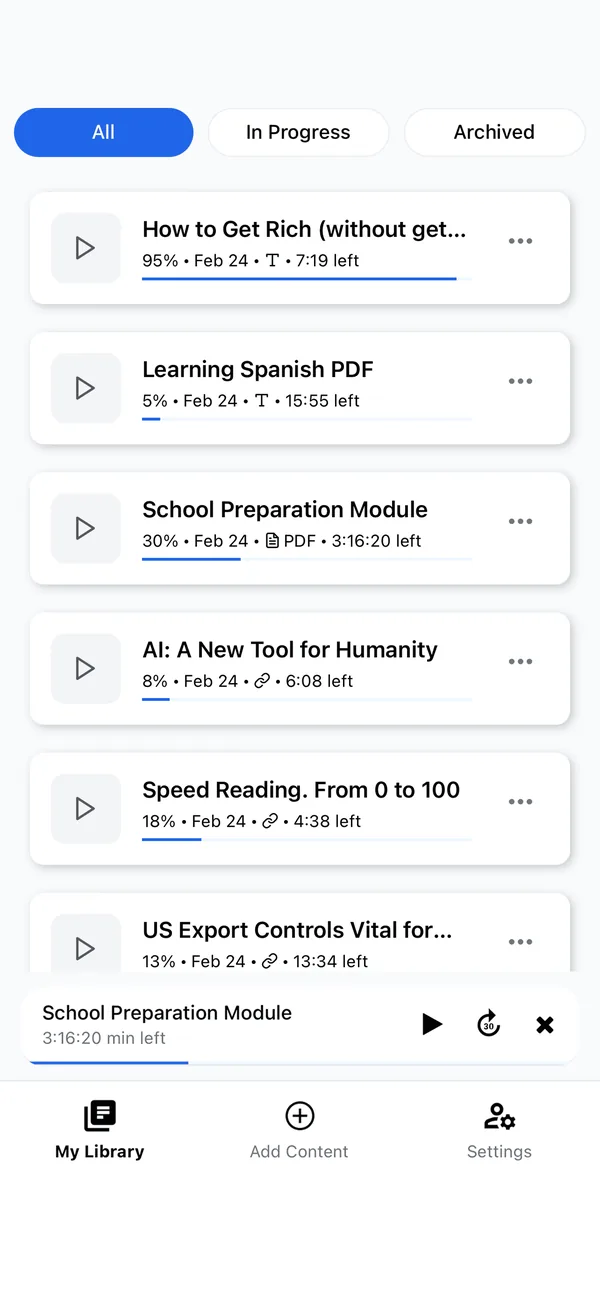
Your “read later” list never gets shorter, because reading needs time at a desk you don’t have. Frateca turns it into audio you can clear in the gaps — the commute, the workout, the walk between meetings. Send a report, long article, newsletter or PDF to Frateca and it lands in your queue as natural audio, ready to play in the background at whatever speed you like.
Turn dead time into done time
Get through what you need to read without adding hours to your day.
Read on your commute
Process reports and long reads on the train or in the car instead of staring at another screen.
Move faster
Listen at 1.5–2× to get through documents and articles in a fraction of the time.
One tap from any app
Tap Share → Frateca in Safari, your inbox, or any app and it’s queued as audio. No copy-paste, no app-switching.
Handles your documents
Reports, PDFs, Word docs, newsletters and web articles — all read aloud in a natural voice.
From inbox to audio in seconds
Fits into the way you already work — no new habits required.
Send it over
Share a report, article or PDF straight from your browser or inbox, or paste the text in. It joins your listening queue.
Frateca narrates it
Natural AI voices convert it to audio in minutes — whole PDFs and long articles included.
Listen between the gaps
Play in the background on your commute or workout, at the speed that suits you. Pick up where you left off on any device.
“This app has saved me! Frateca has helped me to cut down time especially when driving/traveling. Instead of reading I can listen to my documents on my way. It’s a great app and I’m excited about the update!”
Questions, answered
What can Frateca read for work?
Reports, long articles, newsletters, PDFs, Word documents and web pages — all converted to natural audio. You can send anything to Frateca with the share button from your browser or inbox.
How much time does listening actually save?
Listening at 1.5–2× roughly halves the time a document takes, and it happens during commutes and workouts you couldn’t read in anyway — so the practical saving is even larger.
Can I listen on my commute without a connection?
Yes. Generating audio needs a connection, but once a file is converted it plays from your library offline, which is ideal for trains, flights and patchy signal.
Is there a free plan?
Yes — a free plan with natural voices and no credit card required. Premium unlocks unlimited listening for heavier reading loads.
Clear the backlog. Press play.
Start free and turn your reading list into something you finish on the move.
Start listening free →