Listen to anything, screen-free
Frateca can read supported documents, articles, web pages and books aloud. It complements rather than replaces screen readers, accessible source files and professional support.
Free plan included · Works with VoiceOver & TalkBack · No credit card required
Try a comfortable listening setup
Hear the preloaded passage, compare voices, and change one setting at a time. The preview accepts up to 300 characters.
You've used your free previews
Create a free account to keep listening — turn entire PDFs, ebooks and articles into natural audio, unlimited, and synced across your phone and the web. No credit card needed.
Free demo · up to 300 characters per clip · The app reads whole PDFs, books and articles →
Voice, speed and read-along controls remain available together
The phone shows the genuine Frateca player with visible text, speed and playback controls. It can complement a reading setup, but it does not replace full screen-reader navigation, accessible originals or independent checking of OCR.
✓ Genuine Frateca product interfaceBefore · supported written content
After · genuine Frateca player
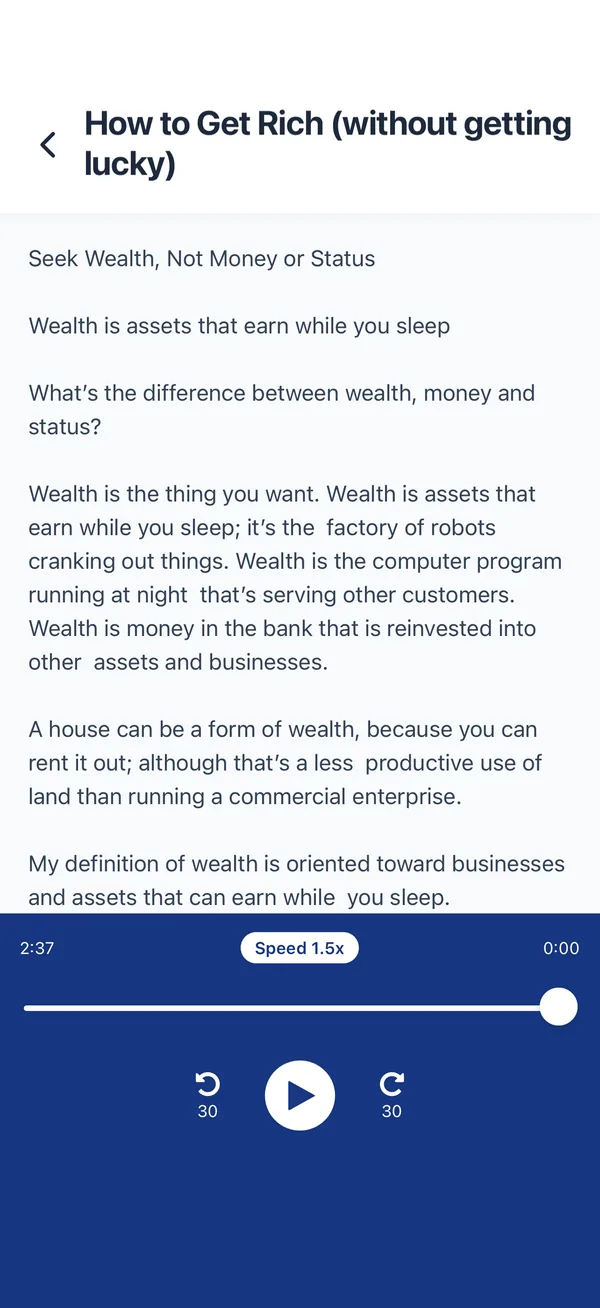
Text-to-speech is one of several tools people may use to access written material. Frateca can speak supported PDFs, articles, web pages, documents and books, while screen readers handle broader device and content navigation. OCR and synthetic speech can make errors, so keep the accessible source available and independently verify critical information.
Designed to be comfortable
Reading on your terms, in the way that works for you.
Screen-free reading
Give your eyes a break. Listen with the screen off and the audio playing in the background.
Tune it to you
Adjust the voice, accent and speed until it feels right. Slow and clear, or fast and efficient — your choice.
Choose a voice
Compare available voices and speeds, then keep the setup the user finds understandable and comfortable.
Reads supported documents
PDFs, web articles, Word docs and pasted text, plus camera scans using OCR that must be checked when accuracy matters.
Anything you read, read to you
Simple to set up, and it works across all your devices.
Add the text
Import a PDF or document, open a web page, paste text, or scan a printed page with your camera.
Pick a comfortable voice
Choose a natural voice, accent and speed that suit you. Frateca converts it to clear audio in minutes.
Listen, eyes free
Play in the background, on any device, even offline. Pause, rewind, and adjust the speed any time.
“I am someone who benefits from reading while also hearing the text read aloud, it helps me to better engage with the article or book. I am a teacher of students with a variety of barriers to learning and I have found that this type of app is helpful for students to access the same content as their peers.”
Questions, answered
Can Frateca complement a low-vision reading setup?
It can speak supported documents with adjustable voices and speed and may be used alongside VoiceOver, TalkBack, magnification or large text. Suitability is individual, and a reading app does not replace full screen-reader navigation or professional support.
Can it read printed pages and PDFs?
It can read text from supported digital PDFs and use OCR on scans or photos. OCR can misread layout, names and numbers, so independently verify medication, legal, financial and other safety-critical information.
What languages and accents are available?
Frateca generates natural audio in English (US and UK), Spanish, French, Italian, Portuguese, Hindi, Japanese and Mandarin Chinese, with multiple voices and accents to choose from.
Does it work offline?
Yes. Generating new audio needs a connection, but once a file is converted you can listen to it offline from your library.
Reading, on your terms
Tune the voice, rest your eyes, and listen to anything. Free to start, on every device.
Try Frateca free →